Evalezy app · Now on iPhone
Check a whole class’s copies from your phone.
Unit Test 3 · Maths
Class 8-BAarav S.
Roll 12
Diya M.
Roll 13
Kabir R.
Roll 14
No name found
3 pages
How it works
Paper in, copies in, checked copies out.
1Add the paper
Add the question paper once.
Upload the question paper PDF and it is read into questions with marks. Evalezy drafts a marking scheme per question that you can edit. Do it once per test; every copy is marked to the same scheme.
Do it in the app (tap New) or in the Evalezy dashboard, with the same login.
Step 1 of 3
SST Half-Yearly Mock · IX-B
SST_half_yearly_IX.pdf
Read · 38 questions · 80 marks
Section AQ1–2020 marksSection BQ21–2612 marksSection CQ27–3218 marksSection DQ33–3620 marksSection EQ37–3810 marksAdd copiesMarking scheme ready
One per question, criteria add up to the marks
2Add the copies
Upload the copies, or click photos of them.
Point the camera at each page and tap the shutter; tap Next student before the next copy. Or pick PDFs or photos already on the phone. Each student’s pages become one PDF.
Step 2 of 3
SST Half-Yearly Mock · IX-B
Scan Upload filesPage 2Aditi Sharma · Roll 14 · IX-B
2 pagesNext student3Get them checked
Every copy comes back checked.
Evalezy reads the name and roll number, matches the copy to the student and checks every answer. The student’s own copy comes back in red pen with the total circled. Download them all as one zip.
Step 3 of 3
SST Half-Yearly Mock · IX-B
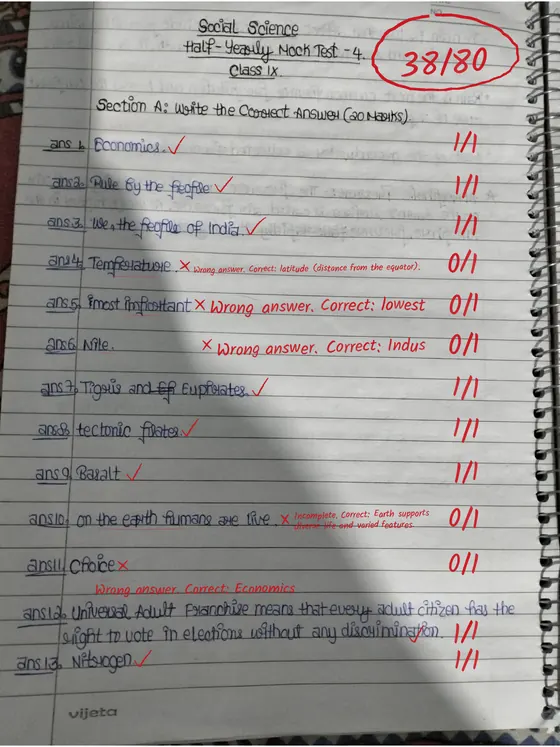 Real checked copyChecked · 38/80
Aditi Sharma
Roll 14
CheckedRohan Gupta
Roll 15
Download checked copiesCheckedSara Khan
Roll 16
Step 1 of 3
SST Half-Yearly Mock · IX-B
SST_half_yearly_IX.pdf
Read · 38 questions · 80 marks
Marking scheme ready
One per question, criteria add up to the marks
iPhone now. Android is in testing and coming soon.
Use cases
Made for the moment the copies land on your desk.
Class teacher, after a unit test
Forty notebooks, one phone. Scan them in the staff room and send the batch before you leave school.
Coaching centre, after a weekend test
The coordinator scans every batch on Sunday. Faculty review marks on Monday and release results.
UPSC answer-writing programme
Mentors scan the day’s answer sheets; aspirants get their own copy back with notes on every answer.
Exam cell, sharing results
Download the zip of checked copies and share it with class teachers straight from the phone.
The same checking as the dashboard.
The app starts exactly the same check. What you get back does not depend on where the copies came from.
- Name and roll number read from page one; unsure copies wait for you
- One marking scheme per question, the same for every student
- Half marks with a written reason on every answer
- The student’s own copy checked in red pen, total circled
- An email when the batch is done
- The pen you chose in Settings: handwriting, ink colour and darkness
- Nothing reaches students until a teacher releases it
See a real checked copy or our case studies.
How it compares
| Evalezy app | Acadine app | A scanner app + checking by hand | |
|---|---|---|---|
| Made for | The teacher or exam cell checking copies | Students, teachers and admins of one institute (white-label) | Turning pages into PDFs |
| Scan copies with the camera | Yes, page by page, Next student between copies | Not described | Yes |
| AI checks the copies | Yes, every answer against one scheme per question | AI evaluation is in Acadine; doing it from the app is not described | No |
| Copy matched to the student | Name and roll number read from page one | Not described | No, you rename files |
| What comes back | The student’s own copy checked in red pen, as a zip | Notifications for grades, tests and announcements | The PDF you scanned |
| Teacher review before students see marks | Yes, in the Evalezy dashboard | Results publish automatically (teacher guide) | Not applicable |
| Price | 1 credit per page, from your plan’s credits; failed copies free | Not published | Free or a subscription; checking is still by hand |
Acadine’s column is read from acadine.ai and docs.acadine.ai on 29 October 2026. Full, sourced comparison: Evalezy vs Acadine.
Frequently asked questions
Where can I download it?+
On the App Store for iPhone, as “Evalezy: AI Copy Checking”. Android is in testing on Google Play and coming soon. On any phone or computer you can also use the same app in the browser at evalezy.vacademy.io.
Can I try it free?+
Yes. Start a 3-day free trial from the app or the website: 1 teacher, 50 free AI credits (1 credit = 1 page), no card. Sign up with Google on the web, or with your email and a one-time code.
Does it cost extra?+
No. The app uses your institute’s Evalezy plan and credits, the same as the dashboard: 1 credit per page checked. Failed, stopped and unreadable copies are free.
Can I create the test in the app?+
Yes. Tap New, give the test a name and total marks, and add the question paper as a PDF or photos. Evalezy reads it into questions; you check them and switch on AI checking. Reviewing, editing and releasing marks happen in the Evalezy dashboard.
Can I choose the pen the AI writes with?+
Yes. In the app’s Settings, pick the handwriting, ink colour, darkness and size, and whether remarks go on the copy or beside it. Every copy checked after you save uses that pen.
What if a copy has no name on it?+
It waits for you. Pick the student from the list and the copy is checked; nothing is filed under a guessed name.
Can our institute control who uses it?+
Yes. An institute admin can switch the app off, or turn camera scanning and file upload on or off separately.
Is there an app for students?+
The Evalezy app is for teachers and exam cells. Students receive their checked copy by email when you release results.
See your own copies checked.
Book a 20-minute demo. Bring a question paper and a few scanned answer sheets, and watch Evalezy check them in red pen.